Traduction de conversations en direct
Traduisez les conversations parlées en temps réel pour que tout le monde suive le rythme.
 Telepromptme
 Autoprompt
 DualScroll
 Narrate
 Lightboard Pro
 Earwig
 ChatterFish
 PointyPointer
 intuner
ChatterFish traduit les conversations en direct au fur et à mesure qu'elles se déroulent. Parlez dans le micro ou extrayez l'audio de n'importe quelle application et regardez les sous-titres traduits apparaître instantanément – afin qu'une barrière linguistique ne gêne plus jamais une conversation.
ChatterFish is focused, fast and refined — built to do one job beautifully.
Traduisez les conversations parlées en temps réel pour que tout le monde suive le rythme.
Traduisez ce que vous dites dans le micro ou dans le son provenant de n'importe quelle application.
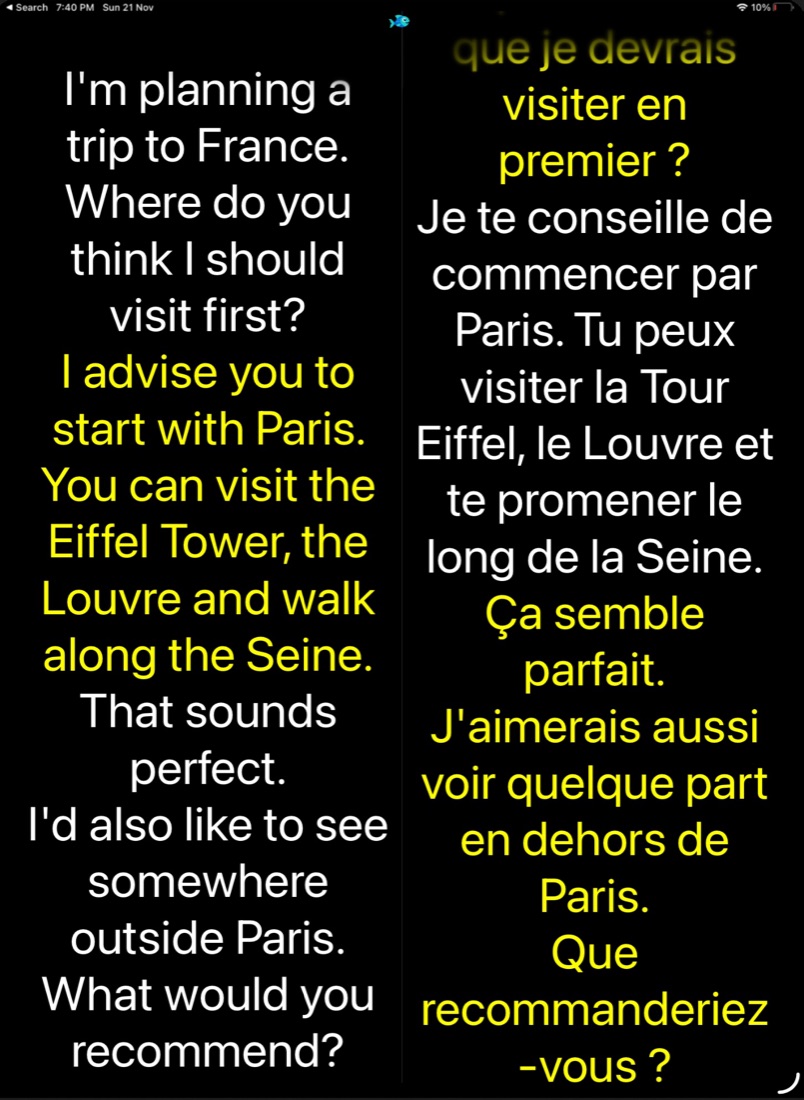
Les légendes traduites apparaissent à l’écran dès que les mots sont prononcés.
Reliez un large éventail de paires de langues pour des échanges naturels.
Transcription précise et réactive qui maintient la conversation fluide.
Choisissez vos langues et commencez à parler – c'est toute la configuration.
Traduisez les conversations parlées en temps réel pour que tout le monde suive le rythme.
Traduisez ce que vous dites dans le micro ou dans le son provenant de n'importe quelle application.
Les légendes traduites apparaissent à l’écran dès que les mots sont prononcés.
Reliez un large éventail de paires de langues pour des échanges naturels.
Transcription précise et réactive qui maintient la conversation fluide.
Real moments from ChatterFish, captured on device.
Un achat couvre à la fois iOS et macOS. Aucun compte requis.
Essayez le traducteur complet, gratuitement.
Traduction de conversations illimitée.
Téléchargez-le sur l'App Store et démarrez en quelques minutes — sur iPhone, iPad et Mac.